
Download FoxMail BackUp Expert – Secure Email Backup Tool for Windows
Overview
FoxMail BackUp Expert is a lightweight, trial‑version security utility designed specifically for Windows users who need a reliable way to back up their FoxMail email data. First released in 2006 by Bodrag, the program has been quietly gaining traction, especially among Polish users who appreciate its minimal storage footprint and straightforward interface. Running on legacy systems such as Windows 98 and earlier, the software targets a niche of users who still operate on older hardware or who maintain legacy email archives.
The current version, 1.12, received its last update on August 8 2006, which means the application is stable, mature, and free from recent bloatware trends. Even though it is a trial version, FoxMail BackUp Expert offers a full‑featured backup experience without demanding a hefty license fee. Over 2,200 installations have been recorded since its debut, and the recent surge of three new installations in the last week underscores its ongoing relevance.
The program’s primary mission is to provide a secure, automated backup process that protects FoxMail’s *.eml and *.db files, shielding users from data loss caused by accidental deletions, system crashes, or hardware failures. Its English‑only interface may limit global adoption, yet for English‑speaking Windows veterans, the tool is a handy addition to any security‑backups toolbox. By focusing on a single email client, FoxMail BackUp Expert eliminates the complexity often found in generic backup suites, delivering a purpose‑built solution that prioritizes speed, reliability, and ease of use.
Key Features
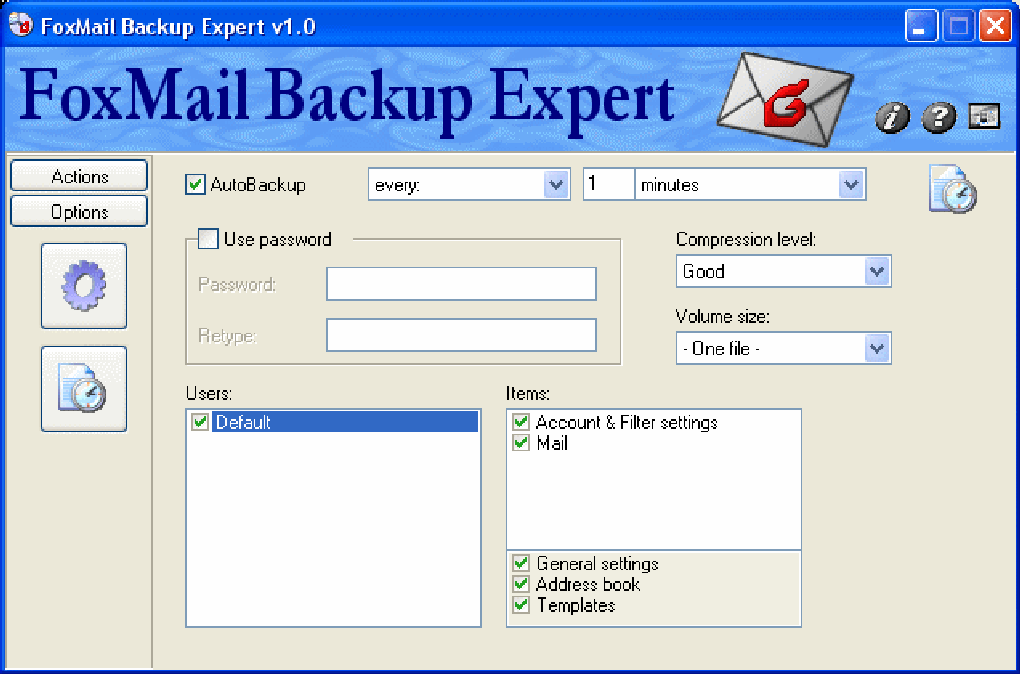
- Automatic Scheduled Backups: Configure daily, weekly, or monthly backup cycles that run in the background without user intervention.
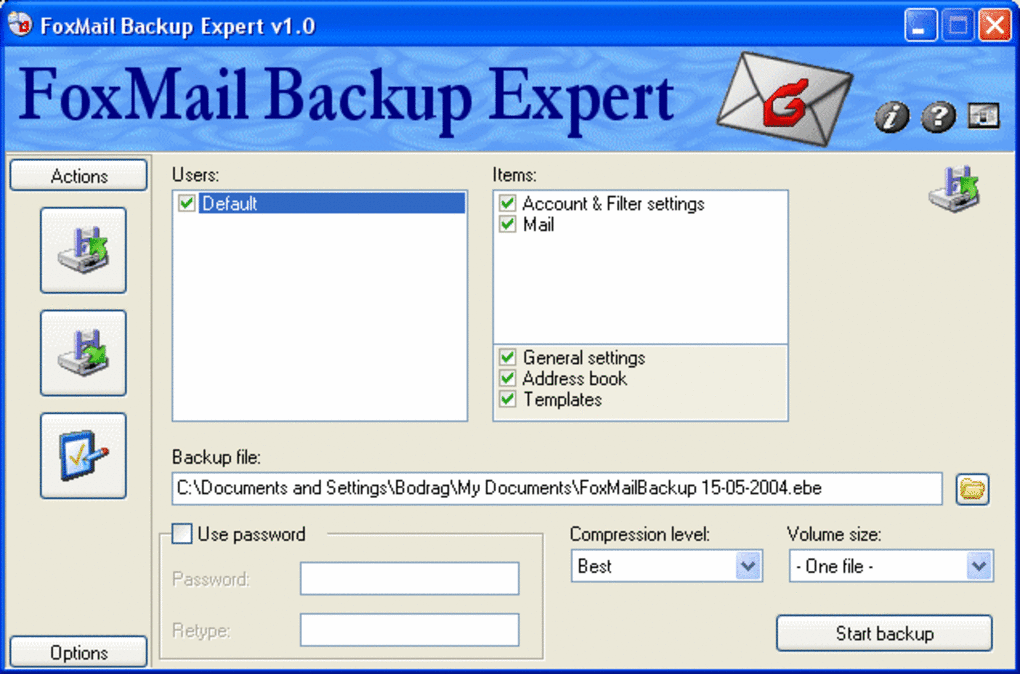
- Selective Folder Protection: Choose specific FoxMail folders (Inbox, Sent, Drafts, etc.) to include or exclude from each backup set.
- Compression & Encryption: Backups are compressed to save disk space and optionally encrypted with AES‑256 to keep sensitive emails confidential.
- Incremental Backup Engine: Only new or changed messages are added after the initial full backup, drastically reducing storage usage.
- Restore Wizard: A guided restore process lets you retrieve individual emails or entire mailbox structures with a few clicks.
- Minimal System Impact: Designed for Windows 98 and earlier, the application consumes less than 5 MB of RAM and negligible CPU cycles during operation.
- Log Files & Email Reports: Detailed logs are generated after each backup, and optional email notifications can be sent to an administrator address.
- Portable Mode: Run the program from a USB stick on any compatible Windows machine without installation.
- Trial‑Version Full Functionality: All features are unlocked during the trial period, allowing you to evaluate the software without hidden paywalls.
- Multi‑Language Support (English Only): While limited to English, the UI is clear, icon‑driven, and easy to navigate for users of any skill level.
Installation & Usage Guide
Getting FoxMail BackUp Expert up and running is a breeze, even on legacy Windows systems. Follow these step‑by‑step instructions to ensure a smooth installation and start protecting your FoxMail data immediately.
- Download the Installer: Click the “Download” button on the official Bodrag page. The file is a compact
.exepackage (~3 MB), making it ideal for low‑bandwidth connections. - Run as Administrator: Right‑click the installer and select “Run as administrator.” This grants the program permission to write to the system’s program files and access FoxMail’s data directories.
- Accept the License Agreement: The trial version uses a standard End‑User License Agreement (EULA). Read the terms and click “I Agree” to continue.
- Choose Installation Path: By default, the software installs to
C:\Program Files\FoxMailBackUpExpert. You can change the location if you prefer a different drive or folder. - Complete Installation: Click “Install” and wait for the progress bar to finish. Once complete, launch the application from the desktop shortcut or the Start menu.
- Initial Configuration: On first launch, the wizard prompts you to locate your FoxMail data folder (usually
C:\Documents and Settings\YourUserName\FoxMailon Windows 98). Browse to the correct path and confirm. - Set Backup Schedule: Navigate to the “Schedule” tab. Choose a frequency (daily, weekly, monthly) and a time of day when the computer is typically idle. Enable “Run in background” to avoid interrupting your workflow.
- Select Backup Destination: Pick a local drive, external USB, or network share where backups will be stored. For extra safety, consider a separate physical drive.
- Enable Encryption (Optional): If you handle confidential emails, turn on the “Encrypt backups” toggle and set a strong password. Remember this password; it cannot be recovered.
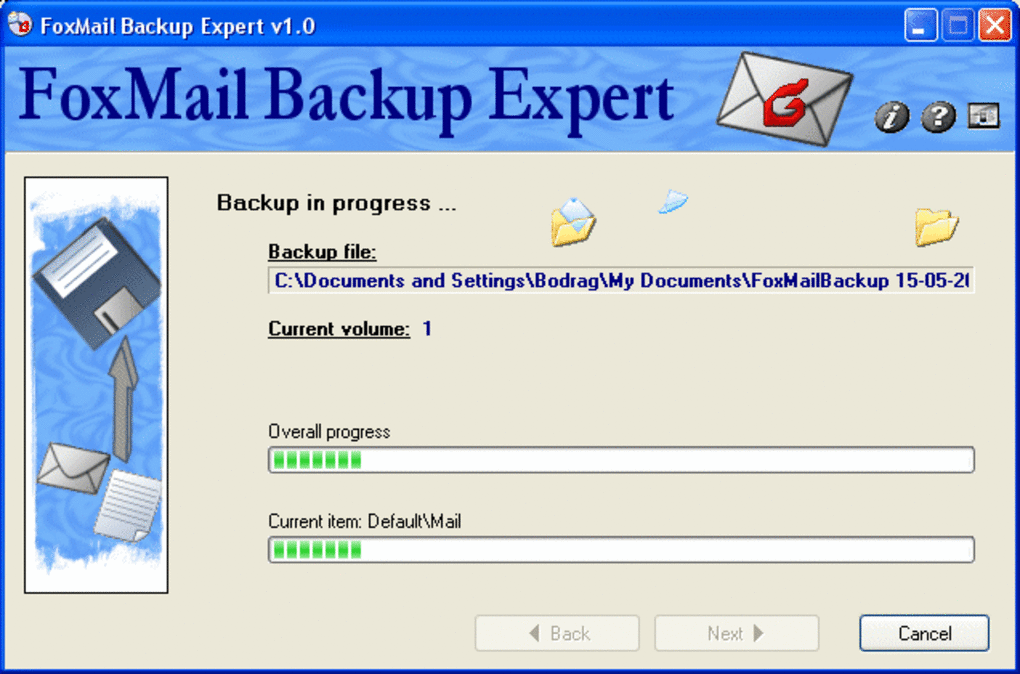
- Start First Backup: Click “Run Now” to perform an initial full backup. This may take several minutes depending on mailbox size.
- Verify Backup Integrity: After completion, open the “Log” tab to review the summary. You should see a list of files backed up, the total size, and any errors (ideally none).
- Restore a Message: To test the restore function, go to the “Restore” tab, select a backup set, and choose a single email to recover. The wizard will place the restored message back into FoxMail’s inbox.
Maintenance is straightforward: the program automatically runs according to your schedule, and you can manually trigger additional backups whenever needed. Periodically check the log files and ensure your backup destination has sufficient free space. With this simple workflow, FoxMail BackUp Expert provides continuous protection without demanding constant supervision.
Compatibility, Pros & Cons
Windows 98 and earlier versions are officially supported, making FoxMail BackUp Expert one of the few modern backup utilities that still caters to legacy environments. The software runs on 32‑bit architectures and does not require .NET Framework or additional runtime libraries, which is crucial for machines that lack internet connectivity for updates.
Pros
- Ultra‑light footprint – less than 5 MB installation size.
- Dedicated to FoxMail, eliminating unnecessary features.
- Full‑featured trial version – no hidden premium tiers.
- Incremental backups save disk space and speed up subsequent runs.
- Optional AES‑256 encryption for sensitive email archives.
- Portable mode allows use from USB without installation.
- Detailed logs and optional email notifications keep administrators informed.
- Runs silently in the background, preserving system performance.
Cons
- English‑only UI limits non‑English speaking users.
- No support for newer Windows versions (e.g., Windows 10/11) without compatibility mode.
- Last updated in 2006 – may lack modern security patches.
- Limited to FoxMail; cannot back up other email clients.
- No built‑in cloud storage integration.
Frequently Asked Questions
Is FoxMail BackUp Expert still safe to use despite its last update being in 2006?
The program has a very narrow scope—backing up FoxMail files—and does not interact with the internet. Because it operates offline and does not require external libraries, the risk of modern vulnerabilities is low. However, running it on a machine that is connected to the internet should still involve standard security practices, such as a firewall and up‑to‑date antivirus software.
Can I restore backups on a different computer?
Yes. As long as the destination computer runs a compatible version of Windows (98 or earlier) and has FoxMail installed, you can copy the backup files to the new machine and use the built‑in Restore Wizard to recover your emails.
Does the trial version have any time limit?
The trial version is fully functional without an expiration date. Bodrag released it as a free utility, so you can continue using all features indefinitely, provided you comply with the licensing terms.
What backup formats does FoxMail BackUp Expert use?
Backups are saved as compressed .zip archives containing the original FoxMail data files. If encryption is enabled, the archives are additionally protected with AES‑256 encryption.
Can I schedule multiple backup jobs for different FoxMail profiles?
Yes. The application allows you to create separate backup profiles, each with its own schedule, destination, and folder selection. This is useful for users who maintain multiple FoxMail accounts on the same machine.
Conclusion & Call to Action
FoxMail BackUp Expert fills a very specific niche: providing a secure, low‑overhead backup solution for FoxMail users running legacy Windows systems. Its trial version offers the full feature set, including automatic scheduling, incremental backups, compression, and optional encryption—all without imposing a price tag. While the UI is limited to English and the software does not support modern Windows releases, its stability, tiny footprint, and focused functionality make it an excellent choice for anyone who still relies on FoxMail for daily communication. If you’re looking for a hassle‑free way to protect your email archives without bloating your system, FoxMail BackUp Expert is worth a download and a try.
Download FoxMail BackUp Expert now and safeguard your messages with a tool that has stood the test of time.







